Platform

One layer. Nine modules.

Every module shares the same locations, people and data. Start with one, add the next when you see the result.

The system

Five areas, one data layer

Your sites · restaurants · hotels · production · stores · warehouses
SiteQuiltone data layer · same sites, same people, same numbers
1

Front of house

POS & inventory management · Glovo & Bolt in one screen · online ordering · virtual assistant (chat & voice)

2

Kitchen

Step-by-step KDS · recipes & costing · labels & expiry · live stock

3

Back office

Documents AI · P&L and cash flow per site · sales matched to the fiscal Z report

4

Compliance

Vision on your existing cameras · checklists · digital audits · permits

5

People

Multilingual training · step guidance at the station · shift planning

POS · ERP · Accounting · HR · Delivery platforms · Cameras you already own

Front of house

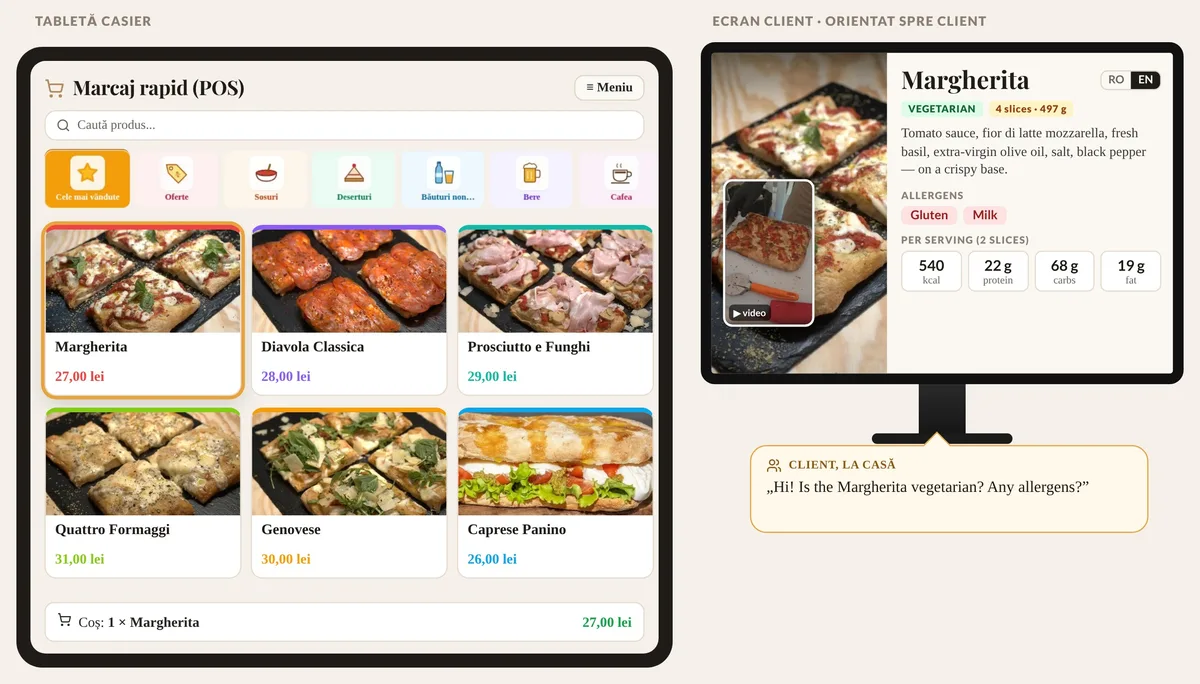
POS & inventory management, with voice and an integrated scale

Orders can be dictated by voice at the counter, and every receipt is tied to the cashier who issued it, confirmed by voice. Card payment and the fiscal receipt come straight from the register, with screens for guests and the kitchen. The integrated scale weighs against the recipe, so portion deviations land directly in food cost.

  • POS & inventory management
  • Voice ordering
  • Cashier voice check
  • Integrated scale
  • Card & fiscal receipt
  • Glovo & Bolt in one queue
POS & inventory management, with voice and an integrated scale – app screen

Kitchen

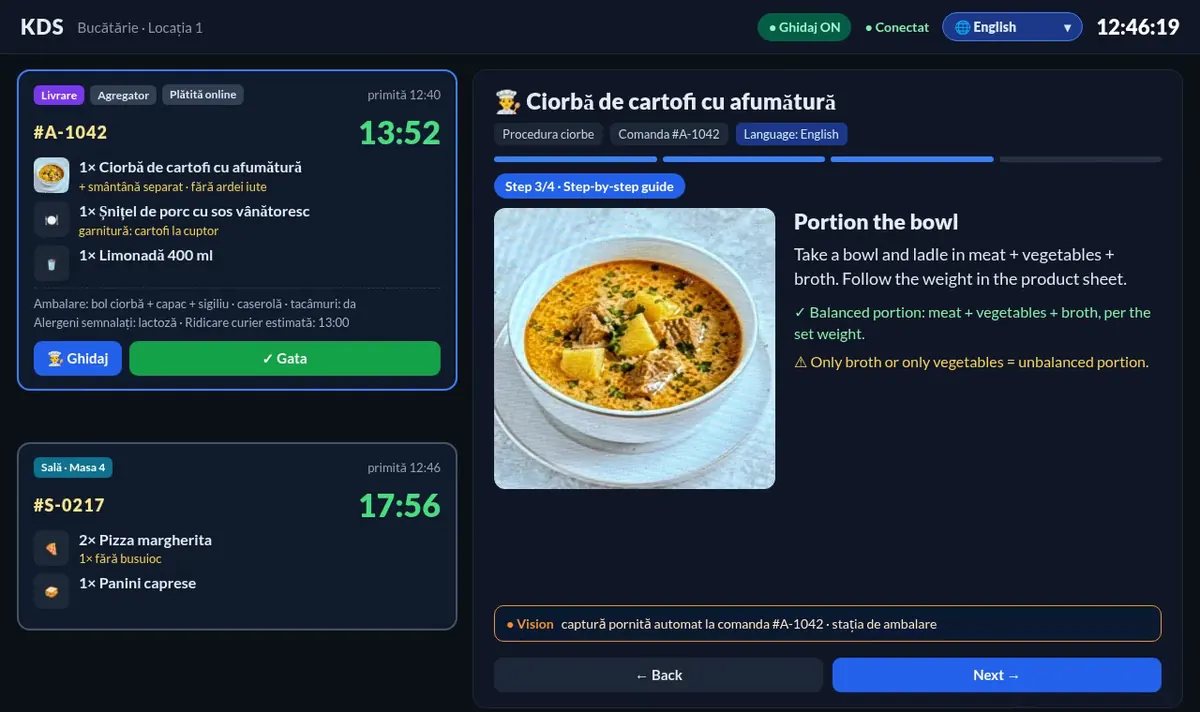
A kitchen that guides every step

A step-by-step kitchen display, recipes and costing, labels with use-by and allergens, and live stock.

  • Step-by-step KDS
  • Recipes & costing
  • Expiry tracking
A kitchen that guides every step – app screen

Back office

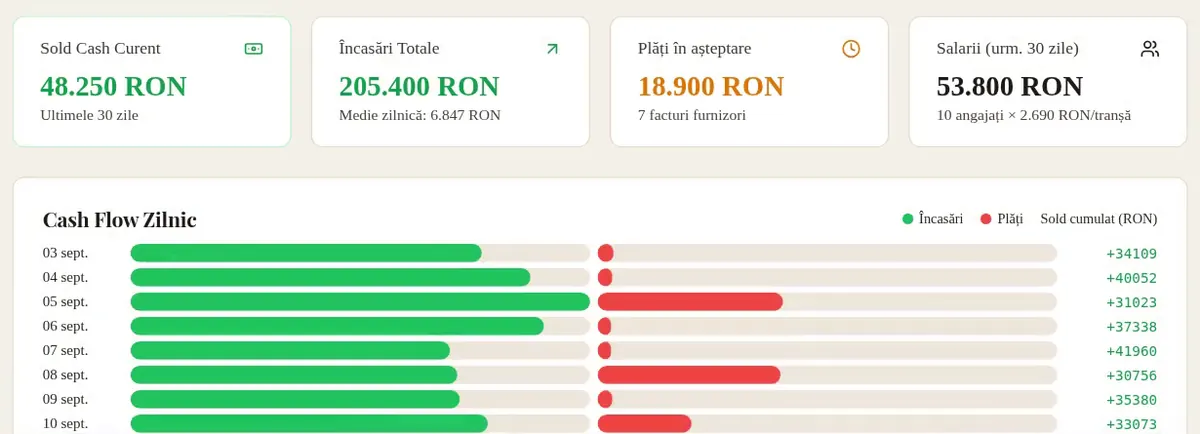
Invoices in. Catalog, stock and numbers out.

Supplier e-invoices are pulled automatically from the national e-invoicing system. New products are enrolled in the product catalog on their own, the goods-received note is created automatically, and you get a notification when a product is not yet assigned to a recipe. The same invoices populate the P&L per location, and cash flow updates itself. Daily sales are matched to the fiscal Z report.

  • Automatic catalog enrollment
  • Automatic goods-received note
  • Unassigned-recipe alerts
  • P&L from e-invoices
  • Automatic cash flow
  • Z reconciliation
Invoices in. Catalog, stock and numbers out. – app screen

Guests

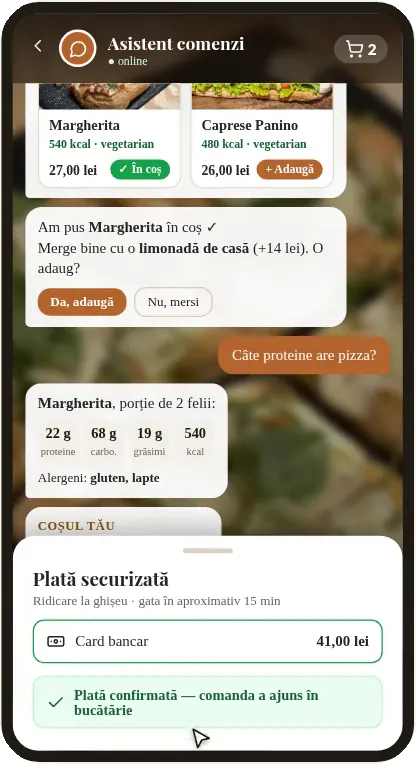
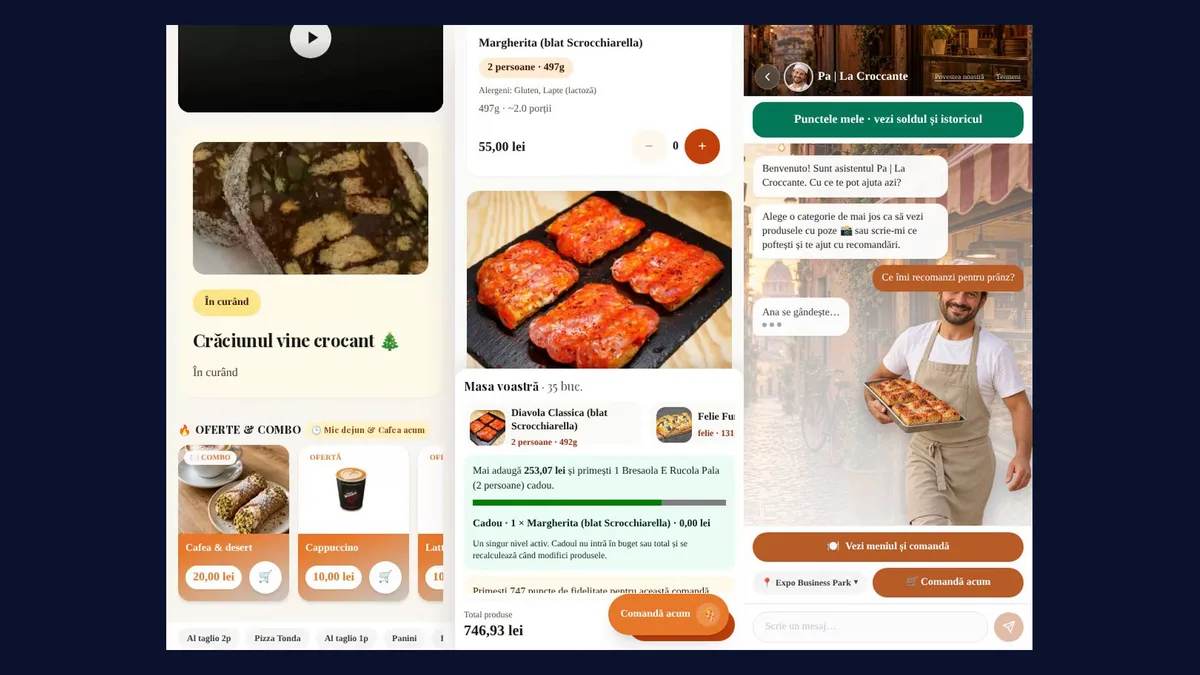
A virtual assistant that answers

A virtual assistant takes questions and orders on chat and on the phone, and hands over to your team when needed.

  • Chat
  • Voice
  • Hand-over to staff
A virtual assistant that answers – app screen

People

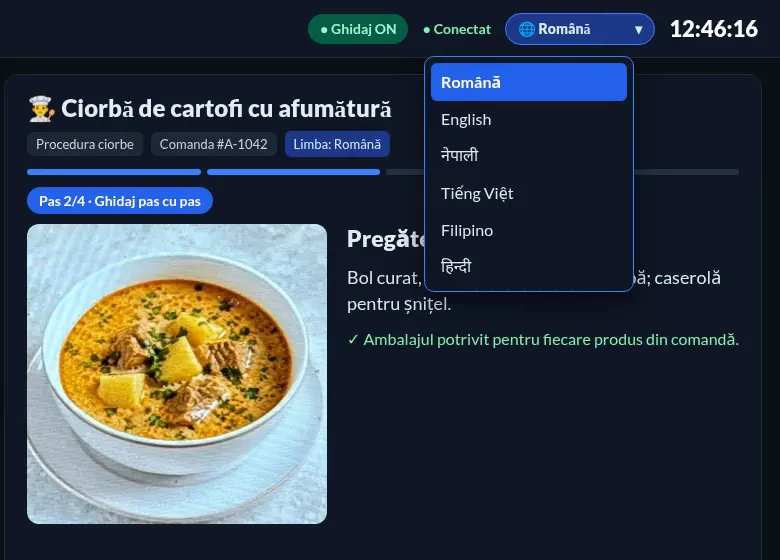
Training in every language

Induction, recipe videos and station guidance in the language of each team member.

  • Multilingual training
  • Station guidance
  • Quizzes
Training in every language – app screen

E-commerce

An online store live-synced with your POS

Your online store and your register share the same data. Products, prices, descriptions, photos, offers and availability change live, on the register and online at the same time, with no double entry. Change a price at the register and the site updates instantly. Mark a sold-out item unavailable and it disappears online. Launch the lunch offer once and it shows up on both.

  • Same menu
  • Same prices
  • Same stock
  • Offers in one place
An online store live-synced with your POS – app screen

Compliance

Your cameras become proof

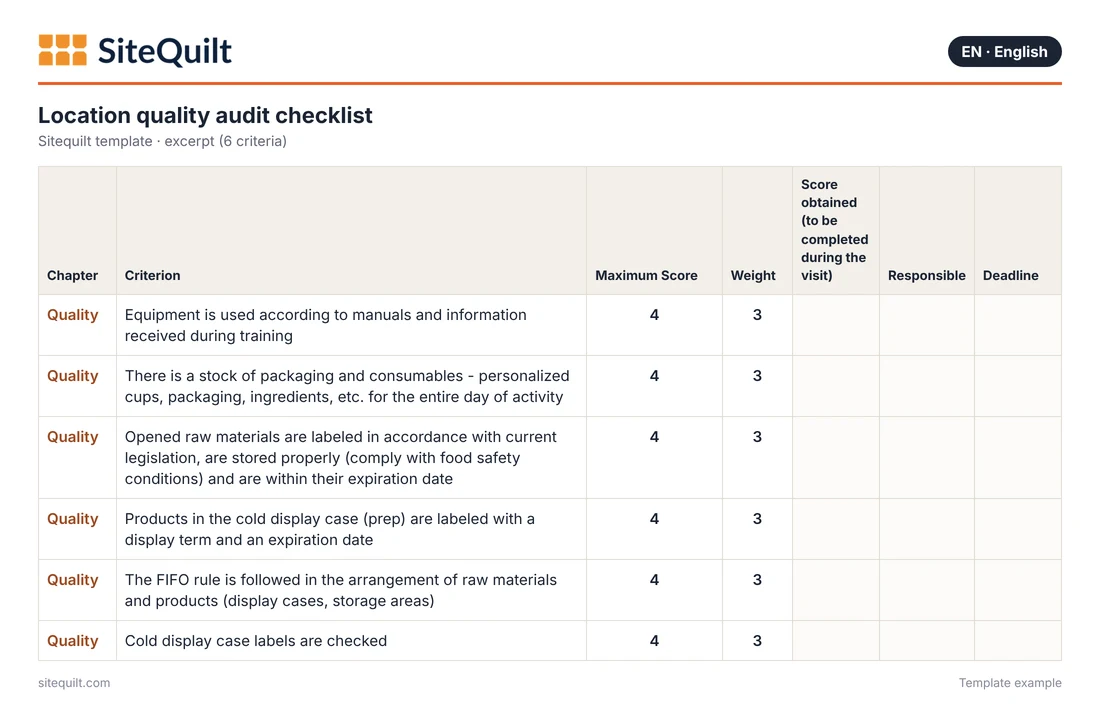
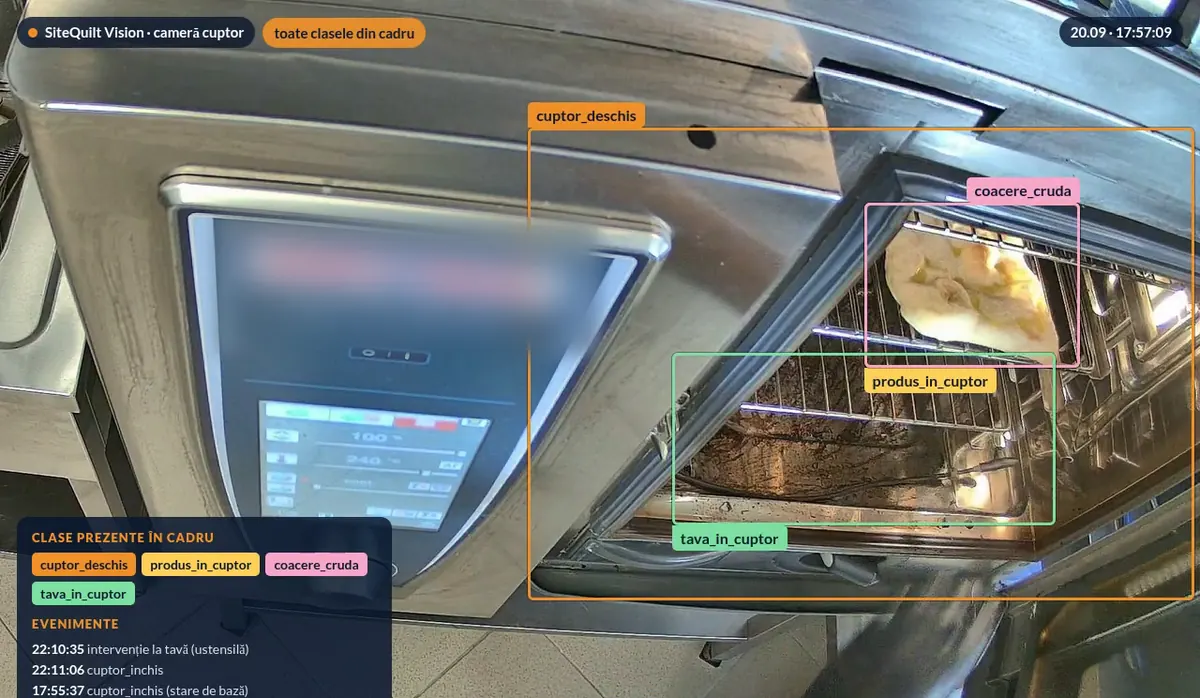
The cameras you already have confirm products, process steps and equipment status. Processed on site; we track the process, not the person.

  • Processed on site
  • Checklists
  • Digital audits
Your cameras become proof – app screen

Documents

Every document on time, every site ready for inspection

Documents are read once, filed per location and tracked against a predefined roadmap.

A predefined roadmap

Each location gets the list of documents it needs, with due dates and renewals: permits, authorisations, contracts, staff medical checks, pest control, equipment checks.

Example: a new site starts with its document roadmap already filled in, so nothing is forgotten at opening.

Expiry alerts

Reminders before a document expires, sent to the person responsible, with escalation if nothing happens.

Example: 30 days before the pest-control contract expires, the manager gets an alert; 7 days before, so does the owner.

Missing-document alerts

If a document on the roadmap is not uploaded by its deadline, the location is flagged on the dashboard.

Example: a new team member starts Monday without a medical check on file, and the site is flagged the same morning.

Operations & training

Two modules that keep every site on standard

Operational module

Every shift, done and visible

  • Digital opening and closing checklists for every shift, with an owner and a deadline
  • Temperature and HACCP checks logged at the station, not on paper
  • Equipment tickets (oven, fridge, hood) tracked until they are fixed
  • Digital audits and permits, with reminders before they expire
  • Live stock and shift planning
  • One screen that shows, per location, what is done and what is late

Example: the fridge reads 7 °C at the 10:00 check. A ticket opens automatically, the manager sees it, and the fix is logged against the same location.

Training module

New people, ready for the station

  • Induction for new staff, in their own language
  • Recipe videos and step-by-step guidance at the station: how a product is assembled, portioned and plated
  • Short quizzes after every module, so you know who is ready for which station
  • The same standard in every location
  • A virtual assistant for the team that answers procedure questions during the shift, in each person's language

Example: a new cook opens the burger station guide in their language, follows the steps on screen, passes the quiz and is marked ready for that station.

Advanced module · on request

Predictions and prep without waste

The biggest waste in a quick-service kitchen starts in the morning, with prep done by eye. This module takes it over. It is not part of the standard plans; we configure it on request.

Morning prep list

  • Every morning, a prep list for every location
  • Calculated from sales history and menu engineering
  • Prep exactly what you will sell, with no extra prep that ends up as waste

Prep tracking with expiry

  • Every prep batch goes over the integrated scale and is enrolled automatically
  • A shelf-life label is printed automatically
  • Cameras recognise the prep containers on the line
  • Prep is deducted by recipe and sales, so you always know how much is left
  • An alert 8–10 hours before expiry, or whenever you set it

Example

Monday morning, the list tells you exactly how many portions of each item to prep, based on recent Mondays and the current menu mix. At 14:00 it shows 6 portions that expire at 22:00 and alerts you in time to use them, repurpose them or skip the next batch.

Prep recognised on the line – app screen

Ask about the advanced module How it is priced

Native integrations

Connected to the tools you already run

Couriers from Glovo and Bolt for your own online orders, with live delivery status back in the app.

LiveBasic

Delivery-platform orders land in one kitchen queue.

In rolloutBasic

Card payments for online orders, confirmed automatically.

LiveBasic

Daily Z reports captured and checked against sales.

LiveBasic

Answers customers and takes orders on your website, in their language.

LiveMedium

Training, procedures and shift questions answered for staff, in their language.

In rolloutMedium

Supplier invoices and documents pushed to your accounting automatically.

LiveMedium

Email campaigns to your opted-in customers.

LiveMedium

E-invoices downloaded straight from the national tax portal.

In rolloutMedium

Takes customer calls, complaints and requests by phone, in their language.

LivePremium

On-site vision on the cameras you already own.

LivePremium

Live = running today at our own quick-service operation. Package = the plan where the integration is first included. Names are shown as text; trademarks belong to their owners.

See SiteQuilt on your own workflows

A walkthrough built around your industry and locations. Works on top of your current POS, ERP and accounting.